/* This document contains the TSQL needed to configure Classic Mirroring using certificates for encrypted mirroring connections*/
We will need 2 servers with the same version of SQL Server on Principal and Mirror.
We will also create 2 Logins and 2 users. PRINCIPAL_LOGIN and PRINCIPAL_USER ; MIRROR_LOGIN and MIRROR_USER
Based on these logins, we will create a certificate. For testing purposes, we will use a database called mirrordbtest. Please replace this with the user database that you want to mirror.
Note: Before starting, please take a full and log backup from Principal to restore on Mirror with option RESTORE WITH NORECOVERY.
https://docs.microsoft.com/en-us/sql/database-engine/database-mirroring/prepare-a-mirror-database-for-mirroring-sql-server?view=sql-server-ver15#CombinedProcedure
Create a directory to store the certificates on each server. In this example script below, we used C:\Certs to simplify the script across all servers. All 2 certificates will be stored here.
We are using port 5022 for the mirroring endpoint so please open the firewall/Network Security Group for port 5022.*/
--===========================================================--
--===========================================================--
/*Create the master key, certificate from the master key, and encrypt the mirroring endpoint on the
Principal * Please use a secure password /
--create a master key on Principal
USE master;
CREATE MASTER KEY ENCRYPTION BY PASSWORD = 'PassWOrd123!';
GO
--create a certificate from the master key
USE master;
CREATE CERTIFICATE PrincipalCert
WITH SUBJECT = 'Principal Certificate';
GO
--CREATE the mirroring endpoint
CREATE ENDPOINT Mirroring
STATE = STARTED
AS TCP (
LISTENER_PORT=5022
, LISTENER_IP = ALL
)
FOR DATABASE_MIRRORING (
AUTHENTICATION = CERTIFICATE PrincipalCert
, ENCRYPTION = REQUIRED ALGORITHM AES
, ROLE = ALL
);
GO
--Backup the certificate and transfer it to the mirror server
BACKUP CERTIFICATE PrincipalCert TO FILE = 'C:\certs\PrincipalCert';
GO
/*Create the master key, certificate from the master key, and encrypt the mirroring endpoint
on the Mirror*/
--create a master key on Mirror
USE master;
CREATE MASTER KEY ENCRYPTION BY PASSWORD = 'PassWOrd123!';
GO
--create a certificate from the master key
USE master;
CREATE CERTIFICATE MirrorCert
WITH SUBJECT = 'Mirror Certificate';
GO
--CREATE the mirroring endpoint
CREATE ENDPOINT Mirroring
STATE = STARTED
AS TCP (
LISTENER_PORT=5022
, LISTENER_IP = ALL
)
FOR DATABASE_MIRRORING (
AUTHENTICATION = CERTIFICATE MirrorCert
, ENCRYPTION = REQUIRED ALGORITHM AES
, ROLE = ALL
);
GO
--Backup the cert and transfer it to the Principal server
BACKUP CERTIFICATE MIrrorCert TO FILE = 'C:\certs\MirrorCert';
GO
--===========================================================--
/*After all 2 servers have generated the certificates, place all 2 certificates on each server in the C:\certs directory*/
--===========================================================--
/*This portion of the script is to create the logins, users, and set CONNECT ON ENDPOINT permissions on the Principal for Mirror*/
--On the Principal, create a login for the mirror server
USE master;
CREATE LOGIN Mirror_Login WITH PASSWORD = 'PassWord123!';
GO
--create a user from the login
CREATE USER Mirror_User FOR LOGIN Mirror_Login;
GO
--create a certificate that the login uses for authentication
CREATE CERTIFICATE MirrorCert
AUTHORIZATION Mirror_User
FROM FILE = 'C:\certs\MirrorCert'
GO
--grant connect for login
GRANT CONNECT ON ENDPOINT::Mirroring TO [Mirror_login];
GO
--===========================================================--
--===========================================================--
/*This portion of the script is to create the logins, users, and set CONNECT ON ENDPOINT permissions on the Mirror for Principal*/
--On the Mirror, create a login for the Principal server
USE master;
CREATE LOGIN Principal_Login WITH PASSWORD = 'PassWord123!';
GO
--create a user from the login
CREATE USER Principal_User FOR LOGIN Principal_Login;
GO
--create a certificate that the login uses for authentication
CREATE CERTIFICATE Principalcert
AUTHORIZATION Principal_User
FROM FILE = 'C:\certs\PrincipalCert'
GO
--grant connect for login
GRANT CONNECT ON ENDPOINT::Mirroring TO [Principal_Login];
GO
--===========================================================--
--===========================================================--
/*In this section, we will configure mirroring for the database on each server. */
--At Mirror, set Principal server as partner. We are using principal IP because there is no domain DNS
ALTER DATABASE mirrordbtest
SET PARTNER = 'TCP://Principal_IP:5022'; .
GO
--At Principal, set Mirror server as partner. We are using Mirror IP because there is no domain DNS.
ALTER DATABASE mirrordbtest
SET PARTNER = 'TCP://Mirror_IP:5022';
GO
-- Turn off transaction safety since Principal and mirror servers are far away to each other:
ALTER DATABASE mirrordbtest SET PARTNER SAFETY OFF
go
Note: Turning off transaction safety shifts the session into asynchronous operating mode, which maximizes performance
https://docs.microsoft.com/en-us/sql/database-engine/database-mirroring/change-transaction-safety-in-a-database-mirroring-session-transact-sql?view=sql-server-ver15
**Check the mirroring setting at the database level:
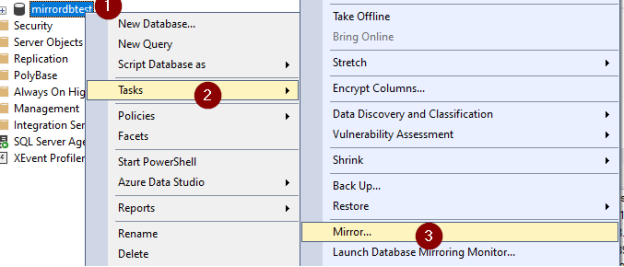
More information: Setting Up Database Mirroring
https://docs.microsoft.com/en-us/sql/database-engine/database-mirroring/setting-up-database-mirroring-sql-server?view=sql-server-ver15