RTFEditor:
Policy Example 3 Simple Change here
|
|

|
|
|
|
|
|
|
Copyright Statement: This NDD is developed by [cp:scripting key='AudienceInfo' attributesystemname='CompanyName' /] for [cp:scripting key='AudienceInfo' attributesystemname='CompanyName' /]’s use in the Installation. Configuration and Implementation of [cp:scripting key='AudienceInfo' attributesystemname='CompanyName' /] network elements. This work product represents Intellectual Property belonging to [cp:scripting key='AudienceInfo' attributesystemname='CompanyName' /] and is only to be used pursuant to contracts between [cp:scripting key='AudienceInfo' attributesystemname='CompanyName' /] and the customer.
Policy - General
|
PURPOSE
(A concise statement of the rationale for the policy, including if appropriate, reference to external regulation, further policy discussion, etc. Provide a summary (in one paragraph) and clearly state the important policy content (e.g., who will or will not do what and in what context).
APPLICABILITY
(Exactly whom the policy applies to and the consequences for non-compliance, if applicable.)
POLICY STATEMENT
(A concise statement of the policy.)
IMPLEMENTATION PROCEDURES
01. Introduction
Termination LetterResearch
Dear
Further to our meeting of (date) I (regretfully) confirm that your employment with us is terminated with effect from (date)/with immediate effect.
As stated at our meeting the reason(s) for terminating your employment with us is/are as follows:Logos
- (Employer must clearly state reasons - transgressions and relevant policies if applicable)
- (Employer must clearly state previous warnings, informal, formal, written etc., and circumstances and person's response and subsequent behaviour/performance for each warning.)
(Clearly state requirements regarding return of documentation, equipment, car, submission of final expenses claims, and any other leaving administration issues.)
(Clearly state actual leaving date, requirement or otherwise to serve period of notice, holiday pay, and other pay and pension details.)
(Clearly state the position regarding the employee's right of appeal, and state the appeal process and timescales.)
(Optional sign-off, for example: Thank you for your past efforts and all the best for your future endeavours.)
Yours, etc.
name and position
(Optionally and recommended: attach, at the foot of the letter refer to, a copy of your written disciplinary process, and also attach and refer to copies of written/printed evidence gathered during the employee's case. This enables employees to understand clearly the case against them, and also the process and their rights during the disciplinary process, which are central to the principles of the employment dispute regulations.)
(Optional section at foot of letter, requiring person to sign, confirming receipt of the letter and any attachment(s), by way of returning a signed copy of this letter.)
a8ab6f4c-188b-4dd2-bb1c-6bca39274099
1.1 Purpose of Document
This is a Preliminary Requirements specification document for a new web-based information management system which was selected for the build out of DataSource: Conversion failed when converting from a character string to uniqueidentifier. as either the application to be used for the actual solution, or as the application to test as part of a pilot project to validate it's capabilities. If this is a pilot project, then all work is done with the understanding that it is not the finished solution, ready for full deployment, but rather the prototype to 'simulate' certain functions once implemented. Oxcyon understands that Client acceptance of the Pilot Project is required, before a decision may be made to select this application as the finished solution, or prior to award of any contract for the full, implemented licensed version.
Centralpoint is a Digital Experience Platfrom technology, which is authored by Oxcyon, Inc. which provides a suite of over 220 modules and tools. Oxcyon,is the author or manufacturer of software product and related modules known as Centralpoint. The project management and implementation will be led by Oxcyon's Production Management team. This team will consist of a Project Manager who will act as your primary, singular point of contact, and that project manager will be responsible for overseeing other intesedour project will be managed within the Oxcyon Issue Management System, and Oxcyon cannot accept issues (or translate via dictation) any issue from any phone or web conference call (discussion). All issues which cover specific requirements (beyond this Scope of Work, Project Requirements, and/or Use Cases), or that were not originally articulated by the Client prior to beginning work, must be submitted in writing, via the Online Issue Management system to request, or identify any new issue. These issues when submitted, must be tagged to your assigned Project Manager, in order for your issue to get the attention it deserves. Should you fail to tag it to your assigned production manager, we cannot be held responsible for receiving it, nor can we provide any guarantees that it will be responded to .
1.2 Project Summary
| Project Name: |
DataSource: Conversion failed when converting from a character string to uniqueidentifier. |
| Oxcyon Project Manager: |
Joseph Frey, jfrey@oxcyon.com, 440-243-1772 |
Oxcyon
Project Team: |
Joseph Frey, Project Manager
Bret Allison, Lead Analyst
Neil Jacobowski, Analyst
James Kekic, Sales Support Analyst |
| Responsible Users: |
Client POC Contacts (TBD) |
1.3 Background
Oxcyon sells technology which is designed to centralize, relate and streamline the search, access and workflow for your members (employees, customers, dealers or others) securely. Oxcyon customers include both businesses and government agencies interested in decreasing the time it traditionally takes clients to search, access, and take action (create documents, order projects, process some requests) incorporating Centralpoint as a technology to streamline and reduce this time. Oxcyon has identified two trends that they believe will cause explosive growth in the demand for their product. The first is the need to centrally manage or index information from disparate sources. The second is to index and classify this disparate information by virtue of the many Audiences, Roles, Tenants, and Classification (metadata, taxonomy) of your users, against this information. Oxcyon's technology Centralpoint leverages unique technology in order to 1.) Centralize (via scheduled routines against disparate data sources, 2.) Securely Authenticate all users (Global Login), 3.) Classify (to create, manage, and automate how your disparate information is classified (or tagged) in order to serve the appropriate audiences (users) who need access to it, and 4.) Capture the user activity around the access of that information, in which to study the usefulness, time savings, and to personalize what content they 'should' want upon revisit. Centralpoint, as a Digital Experience Platform, incorporates many different technology functions, working in unison. (Diagram below)

Figure 1. Digital Experience Roadmap (Illustrating the many relationships to centralize and harmonize information. (Gartner)
Because of the innovative and technical nature of Oxcyon's products, Oxcyon employs sales agents, and production management professionals who can guide customers through the process of choosing from Centralpoint's module gallery (of available functions) to properly forumulate the right solution for the client to apply this roadmap (where applicable) within the organizational structure of each client. This entails customizing Centralpiont around the Taxonomy (Metadata, Terms, Keywords, Codes, Audiences and (Security) Roles of the Client. r At Oxcyon, your Production Manager are identified as a product "owners". The product owner is the expert on translating and implementing these unique features of your organization around this installed version of Centralpoint. .
Currently the client seeks to centralize disparate data sources (Structured data (SQL, Oracle, CSV, Json, XML, Excel) and/or Unstructured data (Word, PDF, Excel, Images, Videos) in order to streamline the day to day operations of their employees (or staff). The client seeks to do this considerate of their network security, meaning that this project will require integration with the current ID Management systems of Client (AD (Active Directory), SAML, oAuth, OpenID, or custom authentication). This is to demonstrate or to implement unique access for each worker, which will summon, filter, and provide access to only the data types (structured or unstructured) that each may have access to.
The Client further seeks to make such centralized disparate data sources available, in order to create and render new collections. In this model, these many data sources will be used to quickly and easily assemble needed information collections, which would empower the Client with rapid response (to assemble) accurate (fresh) information, each time. The output of these new records created could be in a variety of formats (PDF, Word, Json, XML, PPT), and each function to create new assets would be subject to either a simulated (in the case of a Pilot Project) or actual workflow scenarios. In other words, Oxcyon will be expected to show the rapid assembly of these files, in a variety of output types, and also show the workflow, or capabitliy to support workflow regarind the editing, approval, or denial of any new asset (or collection) within the enviornment.
Problems with the current Client system or process include:
- the information available is too limited and the user cannot immediately place an order or take action easily
- the existence of two or more databases or data sources means information is often inconsistent or incorrect
- users who need more technical information have difficulty accessing the relevant data collections, and it often requires reformatting
- time is often not available for the proper assembly of these new assets (documents, booklets, collections) as the Client faces mission critical (time sensitve) demands.
1.4 Project Scope
The scope of this project is to develop (a Pilot) of a web-based Knowledge Management Platform, that supports secure, rapid assembly of need information collections (documents, booklets, file folders) pulling from disparate data sets and/or collections of assets. Oxcyon will deploy both a development portal (local on Oxcyon's environment) and provide an on premise installation of Centralpoint (at Client), in order to set up and prove these claims. All demonstrations will be conducted via web conference, using Oxcyon's local development site, however, the Client will have 'mirror image access' of exactly what was set up (at Oxcyon internally), On Premise, at the client's facility. This is because Oxcyon does not possess the security access or does it have the security clearance to work with live, actual data sets of client. Oxcyon will be demonstrating simulations (with example content), whereas the client will be free to demonstrate (local to their team) actual content or data. This is to prove Oxcyon's claim that this enviornent may run on premise, and connect directly to the (secure) sysems which Client posses.
1.5 System Purpose
The purpose of the system will be to create a 'hub' of data sources (connections to disparate data sources) in which to drag, drop, and assemble new collections of information (documents, booklets, file foldes, collections), needed by various departments and roles of individuals. The Pilot Project iwill be to demonstrate and prove this high level capabilites, but not be expected to generate 'any' new assets which Client may wish to. For the purpose of the Pilot, certain examples will be used (Document Types). These document types, which are frequently used by Client, will be the model, for Oxcyon to set up, develop and train Client, on the usage. For this Pilot Project,
Oxcyon will develop up to 5 frequently used forms by Client as the model. The client may select which 5 forms or collections they would like to see, and would be an expected output format type of MS/Word, and/or Adobe PDF. The Client will also provide a basic (not to exceed two step) workflow, so that as these forms are demonstrated, the workflow, and editing process can be demonstrated. This demonstration will show the scheduled 'ingestion' or live data access to remote data sources, in order to generate dynamically these five output documents. This example will show the user (log in ID), and use such ID to automaticaly filter the available menu by (security) role, allowing different users within Client, to author 'from' different data sources, as their roles may allow. Oxcyon will also show (as one of these 5 frequently used form examples) an example of a 'Dynamic Form to Document' process. This will allow the user to answer a series of (not more than 3 successive) questions, which will then present a refined list of questions (from the previous question), in order to successfully prove the ability to dynamically assemble reports (summoning data from disparate sources) as a result of the answers to questions provided.
Beyond the initial purpose to prove dynamic assembly of asset collections (documents, files). Oxcyon will 'go beyond' the scope to show other departments the high level possiblities of how the centralization and aggegation of data and content can do for them. This may include departments like HR, Travel, Security, etc., to prove the long range capabilities of Centralpoint as an over arching 'Knowledge Management Platform', and will be eager to do so. Oxcyon is NOT required to build out any of these departmental suite of solutions beyond the dynamic document assembly, but will do what it can, with minimal effort (not to distract from the primary system purpose). These efforts may include, setting up learning management, importing in Directory lists (Hotel directories, supplier directories, etc.), in order to demonstrate the self service aspects of having information centralized (ordering, taking action, comparing, rating, reviewing, sorting, etc.). These efforts are volunatiry and in good faith by Oxcyon, to prove the 'reusability' of this pilot for many departments within the Client organization.
1.5.1 Users
Those who will primarily benefit from the new system and those who will be affected by the new system include
- Knowledge Authors:
- Upon implementation of the system, Knowledge authors will find web based dashboards which will allow them to create, edit, delete or revise new asset collections based on their:
a.) Selection of those disparate content types (by check box)
b.) By answers certain questions, wherein the answers guide them to a dynamically populated asset collection
c.) By draggin and dropping dynamic content references into their form to render their new asset or collection.
d.) The system will demonstrate how it can record and report on the activity of all users who accessed each record, and when.
e.) The system will demonstrate how these new assets may inherit taxonomy (metadata) via automated means, based upon the content pulled into the document
- Read Only Viewers:
- a.)The system will demonstrate how some users may only be allowed to read, and download these newly created assets (without editing)
b.)The system will demonstrate how it can record and report on the activity of all users who accessed each record, and when.
c.) The system will demonstrate how two different users (by virtue of their differing roles) can access the same (singular) document, and each see different information (within the singular document) being role filtered
- Project Owners:
- a.) Project Owners will be allowed to create new rules (taxonomy, templates, forms, reports) to demonstrate the flexibility of the system, as well as their ability to maintain the system within the Client environment.
b.) Project Owners will be allowed to execute Data Transfer utilities to aggregate data from both structured and unstructured sources
c.) Project Owners will be allowed to install and set up Server and Database installation of System, to prove the systems performance within the Client Environment
d.) Project Owners will be alllowed to (and will have to) set up system to handshake with their internal security (authentication sources), under the direction of Oxcyon
e.) Project Owners will be allowed to generate reporting against any asset activity or user(s) activity around those newly created assets
f.) Project Owners will be allowed to generate new taxonomy types, including set up automated metadata rules against incoming data (ingested via Data Transfer tools)
Executive Support Department
a.) Executive Support Personnel will be able to compare the time invested in dynamically generated these asset collections vs. the traditional model to pull together needed information.
- Information Technology Department:
- This department will be allowed to investigate Centralpoint code (post installation), On Premise to meet their needed internal security requirements, and test authentication methods of users who log in
This department will be allowed to access Global Login (Authentication sources), Data Transformation tools, Root Directory (code of Centralpoint), Database Diagrams, and have full access to database (and source code, if needed), in which to perform any and all testing it needs to deem that system can be fully adopted by Client, in a full scale implementation, post pilot.
1.5.2 Location
The system will be available via download to be installed at Client's server facility of choice.
Oxcyon personnel will be working on the project remotely (form it's offices in Cleveland, Ohio, Akron, Ohio, Chicago, Illinois, and Los Angeles, California) and attending meetings with Client via web conference only.
Oxcyon intends to meet with Client, On Premise at Client facility post evaluation of the pilot to discuss Client findings, and discuss potential implementation (post pilot).
1.5.3 Responsibilities
The primary responsibilities of the new system:
- provide client staff direct access to up-to-date, accurate information on which they can utlize to assemble new asset colletions quickly.
- support customization to support the specific needs of the client.
- allow differential access to web pages and information based on type of user (role)
- allow client users to process a request, (new document creation, or hotel booking) through a web interface, triggering workflow and dynamically creating the desired output
- allow client to request access to disparate information needed from a AI Assitant (button) from current client web applications (in which the AI Assistance has been placed and allowed to operate)
- provide staff improved access to information which is current and live at all times.
- allow product owners to maintain information about their information and it's workflow
- allow access to version history and user access reporting on demand
- send new requests through workflow to the appropriate reviewer
Other 'desired' features of the new system:
- a consistent "look and feel" throughout the website, by department or role
- full-text searches of the information a user has permission to access
- on-line help in website navigation
- password protection and roles based access scheme for every view
- translation of a web page to another language (using Google API)
- Mobile Responsive (mobile friendly) view of each desktop view (including forms, and new dynamic assets created)
- Live Documents (which can automatically be updated, each time they are opened)
- How disparate data sources (or ingested) content can be made portable (via an AI assistant, whilst on other (client) web based applications
- Online Learning Management (based upon questions answered in line with any asset)
- EDI/Online Ordering (how forms submitted could trigger 'multiple resources' from a central point (booking trips, or multi step functions centralized)
- Natual Language Search (how words not found in documents could trigger those documents as a potential match)
- Reverse Hyperlinks (how any word, term, acronym could be dynamically referenced from all documents (from one record or one definition)
- Targeted 'Ads', (how one search or one action taken may remind (through advertisement and link) other important items (which typically preced the last action)
- Parametic (Tiered) searches, wherein the selection of one menu (for Contintents like Asia) prompts the corresponding sub menu (like Japan or China),
1.5.4 Need
This system is needed in order to service the expected increase in disparate data, and the corresponding demand for assets (documents, information, collections) to be rendered from them. The time sensitive, mission critical nature of any scenario within Client, suggests that such a system would be able to provide information which is of higher relevance, more accurate output, and an ability to render complex collections of information quickly. The new system will allow Client to rapidly respond to needed information, and reduce costs based upon resources and time required today to render these collections in the traditional manner.
1.6 Overview of Document
The rest of this document gives the detailed specifications for the new system. It is organized as follows:
- Section 2: Functional Objectives
Each objective gives a desired behavior for the system, a business justification, and a measure to determine if the final system has successfully met the objective. These objectives are organized by priority. In order for the new system to be considered successful, all high priority objectives must be met.
- Section 3: Non-Functional Objectives
This section is organized by category. Each objective specifies a technical requirement or constraint on the overall characteristics of the system. Each objective is measurable.
- Section 4: Context Model
This section gives a text description of the goal of the system, and a pictorial description of the scope of the system in a context diagram. Those entities outside the system that interact with the system are described.
- Section 5: Use Case Model
The specific behavioral requirements of the system are detailed in a series of use cases. Each use case accomplishes a business task and shows the interaction between the system and some outside actor. Each use case is described with both text and an interaction diagram. An interface prototype is also shown. The system use case diagram depicts the interactions between all use cases and system actors.
- Section 6: An appendix containing a glossary that
defines terms specific to this project
1.7 Deliverables of DataSource: Conversion failed when converting from a character string to uniqueidentifier.
Oxcyon shall deliver to Client the following items, considered the Deliverables
a.) Oxcyon will provide a Centralpoint Master Server for download and installation with Client Enviornment
i.) Including automated back up tools
b.) Oxcyon will provide a Centralpoint Development & QC (Staging) & Centralpoint Portal Environment within Client Environment
i.) Each with their own (Client provided IP Address) to demonstrate the abiltity to synchronize code and content between them (Dev->Staging->Production
c.) Oxcyon will provide a Centralpoint Portal (within Oxcyon's enviornment) for training, testing, and demonstrations
i.) Centralpoint Portal will offer out of the box integration tools to connect to SAML/AD/Other
d.) Oxcyon Centralpoint portal will have all modules 'active' in order to demonstrate over arching Knowledge Management (outside of the forms examples)
e.) Oxcyon will produce up to 5 live online forms (based upon actual real life scenarios at Client) to simulate rapid asset creation (leveraging disaparate data sources). These forms will be presented as a 'Template Gallery'
f.) Oxcyon will create simluated roles (within Oxcyon's enviornment) and instructions on how to set up real roles within the secure (On Premise environment)
g.) Oxcyon will set up and execute (not to exceed 10 data connections) wherein data is either being pulled in live, or via ingestion to demonstrate our ability to ingest and leverage both structured and unstructured data sources (SQL, XLS, JSON, XML, PDF, Word, Images)
h.) Oxcyon will set up 'scheduled' data ingestions to demonstrate the ability to pull from the 'most recent data sets'.
i.) Oxcyon will set up and provide a portal design which is mobile, responsive, including all pages (forms, reports, content dashboards)
j.) Oxcyon will provide training on all of the items mentioned above
k.) Oxcyon will provide online questionairres to assist the Client to gather needed information from any department curious about knowledge management (to process their requests)
l.) Oxyon will set up email alerts, which will be triggered periodically (daily, weekly, monthly) to sample users, to demostate our ability to notify users of 'new disparate data' which may have arrived
m.) Oxcyon will set up and provide training for it's Data Cleaning (Automated Metadata rules) to show how disparate data picked up, ingested or fed through centralpoint can inherit Client metadata (taxonomy) to build crosswalks (related data)
n.) Oxcyon will provide 'flipbook' viewing capability of any PDF output, and will provide MS/Word plug in (for any editing needed from Word).
o.) Oxcyon will provide a sample of NLS (Natural Language Search) libraries to use as an example to crosswalk terms
p.) Oxcyon will provide customization and modiciation to its forms, to allow for question/answer based guidance, to dynamically render output content (documents, collections)
q.) Oxcyon will provide visual search options of forms available (including dynamic forms created for this project) by users (scrolling pictures of forms, which users can select (role based)
r.) Oxcyon will provide both asset level and user level reporting, to include EXT grid view reports, and/or graphical charts showing the usage, topics, taxonomies being managed and thier trend
s.) Oxcyon will execute data imports to demonstrate our ability to transform information (including converting street addresses to maps) including proximity searhes
t.) Oxcyon will set up Audience (microsites) for Client to include Geograhpic Regions, and/or Departments, to show the subset of any of these items above, filtered by these audiences
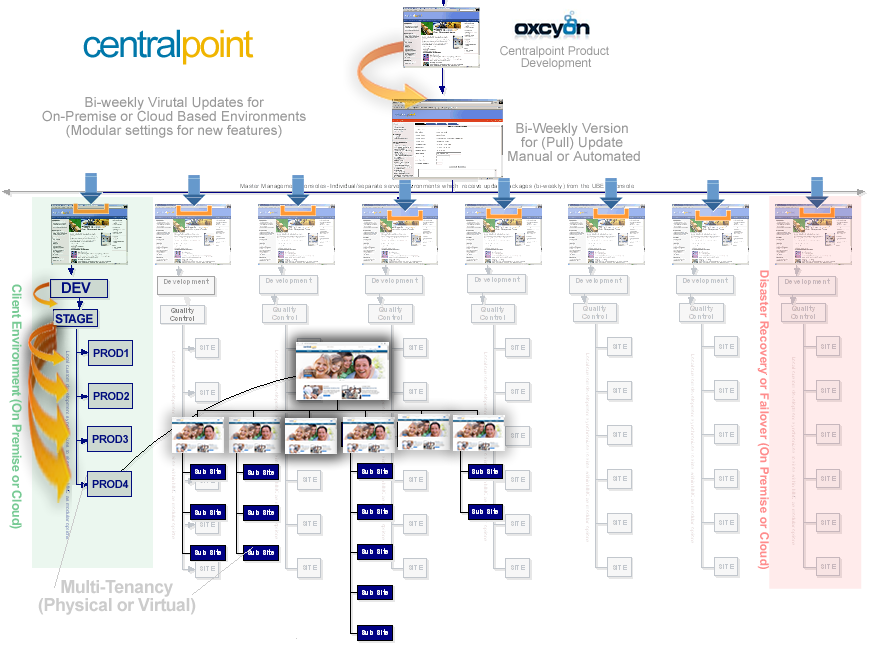
Figure 2. Centralpoint Archtecture, showing (in light green) the Centralpoint Master Server (On Premise) and tiered Dev/QC, Live Production portals living under.

FIgure 3. Enterprise View of Client Portal, including Family Tree of Audiences (Microsites for Deparments or Geographic Regions)
2aa4db54-93a0-4cfa-a2ac-f7226171c622
02. Functional Objectives
2.1 High Priority
- The system shall allow for on-line dynamic document creation by either the knowledge author or staff. For staff, this may be done by questionairre or selectors, or by knowledge authors, by specific selection (more control). This will reduce the time a resource spends on a report by x%. The cost to process an order will be reduced to $y.
- The system shall reflect a new and changed assets within less than 30 seconds of the database being updated by the product owner. This will reduce the number of incidents of incorrectly displayed information by x%. This eliminates the current redundant update of information, saving $y dollars annually.
- The system shall display information that is customized based on the user's role, department, job function, application and locale. This feature will improve service by reducing the mean number of pages a user must navigate per session to x. It should reduce unnecessary phone calls to sales agents and staff by x%.
- The system shall allow employees to view the owner of any asset. An employee should be able to contact the correct owner in one phone call x% of the time.
- The system shall allow a staff member to directly contact the nearest facility for the region in question. This will improve service by reducing the time to respond to a customer request to no more than x days.
- The system shall provide assets which contain the latest or most accurate data. This will allow the document o be processed in x minutes and reliability of data to be increased by y. This promises huge unknown savings based on any inaccurate data being referenced today.
- This system shall provide a clear opportunity how it may be re-used by other departments with Client, to show the maximized repeatability across any department, to streamline their operations
2.2 Medium Priority
- The system shall provide a search facility that will allow full-text searching of assets that the user is permitted to access. The system must support the following searches:
- find all words specified
- find any word specified
- find the exact phrase
- Boolean search
- Suggestions (presented to the user 'as they begin typing'
- The system shall make FAQs available from the task page. This will allow staff to receive guided information as to what to do next, and reduce time lag by 'x'.
2.3 Low Priority
- The system shall allow the user's status to be stored for the next time he/she returns to the web site. This will save the user x minutes per visit by not having to re enter already supplied data.
- The system shall provide suggestions/adverstisements during different phases of their operation. This information will allow staff to determine what information prompts the next step .
- The system shall translate web pages into the languages of the countries where the content may be relevant to different regions (Google API to be used for Pilot) This will improve translation and customer service and reduce the number of support calls from foreign customers by x%.
357e8988-ef35-4bd5-a1ed-79593410faab
05. Use Case Models
- For all use cases, the user can cancel the use case at any step that requires user input. This action ends the use case. Any data collected during that use case is lost.
- For all use cases that require a logged in user, the current login session is updated during the use case to reflect the navigation paths through the use case.
| Use Case Name: |
Login User |
| Summary: |
In order to get personalized or restricted information, forms or specialized transactions a user must login so that that the system can determine his/her access level. |
| Basic Flow: |
- The use case starts when a user indicates that he wants to login.
- The system requests the username and password.
- The user enters his username and password.
- The system verifies the username and password against all registered users.
- The system starts a login session and displays a welcome message based on the user's preferences.
|
| Alternative Flows: |
- Step 4:
- if username is invalid, the use case goes back to step 2.
- Step 4:
- if the password is invalid the system requests that the user re-enter the password. When the user enters another password the use case continues with step 4 using the original username and new password.
|
| Extension Points: |
none |
| Preconditions: |
The user is registered. |
| Postconditions: |
The user can now obtain data and perform functions according to his registered access level. |
| Business Rules: |
Some data and functions are restricted to certain types of users or users with a particular access level. |
| Use Case Name: |
Register User |
| Summary: |
In order to get personalized or restricted information, access forms or do other specialized transactions a new user must register a username and password. |
| Basic Flow: |
- The use case start when a user indicates that he wants to register.
- The system requests a username and password.
- The user enters a username and password.
- The system checks that the username does not duplicate any existing registered usernames.
- The system requests Client expected fields (i.e. name (*), street, city, state, zipcode(*), password, Employee ID) Items marked by (*) are required.
- The user enters the information.
- The system determines the user's location and access level and stores all user information.
- The system executes use case Forms Gallery.
- The system starts a login session and displays a welcome message based on the user's preferences.
|
| Alternative Flows: |
- Step 4: If the username duplicates an existing username the system displays a message and the use case goes back to step 2.
- Step 5: If the user does not enter a required field, a message is displayed and the use case repeats step 4.
|
| Extension Points: |
Register Preferences |
| Preconditions: |
none |
| Postconditions: |
The user can now obtain data and perform functions according to his registered access level. |
| Business Rules: |
- A registered user's location is the Department, Role or Region nearest his zip code via SAML/AD.
- Access levels are
- 0: A user can access only data classification 0
- 1: The user can access data classification <= 1
- 2: The user can access data classification <= 2
The default access level is 0.
- Classification types will be defined and managed by the Client, Oxcyon will simulate these within it's development portal (at Oxcyon)
|
| Use Case Name: |
Register Preferences |
| Summary: |
This use case allows a registered user to enter or change his preferences. |
| Basic Flow: |
- The use case start when a user indicates that he wants to enter or modify his preferences.
- The system displays all current product lines. It indicates any product lines that the user has currently selected.
- The user selects/deselects Regional or Topical Interests.
- The system displays current language preferences. It indicates the language preference currently selected.
- The user may select a different language preference.
- The system stores any change to language preference.
|
| Alternative Flows: |
none |
| Extension Points: |
none |
| Preconditions: |
The user is logged in. |
| Postconditions: |
The system can customize a welcome message based on the user's revised preferences. |
| Business Rules: |
Language selections allowed are are English (default), French and German, for the Pilot (full license includes all). |
| Use Case Name: |
Select Form
Scenario: Staff member fills out the needed form. |
| Summary: |
This use case allows a registered customer to begin creating a collection by selecting a form (from the form gallery). |
| Basic Flow: |
- The use case start when a customer indicates he wants to begin a collection.
- The system displays the customer's information: name, street, city, zip, phone, email, role, department.
- The customer may add or change any of the information.
- The system stores any changes. If the zipcode has changed, the system modifies the customer's location.
- The system requests which form the user would like.
- The staff member selects their form.
- The system displays the appropriate questions and fields based upon that form type.
- The customer selects the appropriate options they want (selecting from various data sources available to them (for that form).
- The system completes the form when user selects 'SUBMIT' button.
- The system shows a 'processing icon' as the collection is created. .
- The system displays a Document (or asset) completion message and prompts the user to view the completed asset.
|
| Alternative Flows: |
- Step 9:
- If the selections (within the form) could not be validated (if a data source is unavailable) , go to step 8 to get another option.
- Step 10:
- If the quantity on hand is not sufficient for this form, a message is sent to the customer and the use case is canceled.
|
a1b03cca-649a-4443-a692-463899b3f3f3
(Provide detailed procedures that are necessary to carry out the intent of the policy.)
DEFINITIONS
(Definitions of terms – as needed.)
REFERENCES
(Cite related laws, regulations, or policies. Give complete references and ensure that documents cited are readily available. If needed, provide additional background discussion here.)
RESPONSIBILITY
(State who is responsible for assuring adherence to this policy and what the specific responsibilities are.)
RESOURCES AND TRAINING
Identify the office and specific individual position/ title – with telephone number and email address, as appropriate – that should be contacted for interpretations, resolution of problems, and special situations
|
8628dc8e-2cf2-450f-91f6-451dfbb98cee
|
PURPOSE
The purpose of this policy to get enforce whatever is about whatever.
APPLICABILITY
To the fullest extent permitted by Law, the (named party) will defend, indemnify and hold harmless [Institution], including its current and former trustees, officers, directors, employees, volunteer workers, agents, assigns and students from and against claims, damages, losses and expenses, including but not limited to attorney's fees, arising out of, or from the performance of its operations or services and for the acts or omissions of its directors, officers, employees, contractors or subcontractors, volunteers, participants, guests or any third party for whom it is responsible, regardless of whether or not such claim, damage, loss or expense is caused in part by a party indemnified hereunder. Such obligation shall not be construed to negate, abridge or reduce other rights or obligations of indemnity that would otherwise exist in the absence of this agreement.e202fc81-4c65-401c-9409-6d9056aeff88
POLICY STATEMENT
|
Our organization’s objective in establishing a dress code is to permit employees to work comfortably, but safely within the learning environment. Employees must project professionalism at all times, as one never knows if potential or current customers, visitors or students may visit the company unexpectedly.
Due to the variance in business and industry models in which all companies revolve around, each simulated workplace is required to develop a dress code conducive to their company. The following template will assist and guide instructors and students in developing their company dress code.
All casual clothing is not suitable for the workplace. These guidelines will help the supervisor and employees determine appropriate dress for their company.
* Clothing considered suitable for hanging out, hunting, yard work, exercise sessions, or social events is not always appropriate for work environments.
- Clothing that reveals too much cleavage, your back, your chest, your feet, your stomach or your underwear is not appropriate for a place of business, even within the Simulated Workplace classroom.
* If you can trip over your jeans because the legs are too long it is a safety issue.
- Even in a business casual work environment, clothing should be pressed and never wrinkled.
- Torn, dirty, or frayed clothing is unacceptable.
- Any clothing that has words, terms, or pictures that may be offensive to other employees, customers or visitors is unacceptable.
- Clothing depicting the school or company logo is encouraged.
- Sports team, university, and fashion brand names on clothing are generally acceptable.
- Certain days may require specific dress.
Interviews, presentations, field trips, or when visitors are coming to the classroom, employees may be required to wear a company shirt with clean jeans or kaki’s.
- No dress code can cover all contingencies; therefore, employees must exert a certain amount of judgment in their choice of clothing.
If employees experience uncertainty about acceptable or professional business casual attire, they are advised to ask the supervisor for approval.
Shoes and Footwear
- Shoes and Footwear: (Enter type(s) of acceptable footwear) are acceptable for Simulated Workplace environments.
- Flip-flops, slippers, and any shoe with an open toe are not acceptable at Simulated Workplace environments due to safety violations.
- (Enter the type(s) of acceptable shoes/boots) shoes/boots are required in the manufacturing operation area.
- Inappropriate attire for work includes:
Jewelry, Makeup, Perfume, and Cologne
- Jewelry, makeup, perfume, and cologne should be in good taste.
Remember, that some co-workers, customers or visitors may be allergic to the chemicals in perfumes and make-up, so wear these substances with restraint.
- Body piercing should be limited and in some instances removed or covered, in order to compile with safety regulations.
- Tattoos should be limited and in some instances covered, especially if they may be offensive to co-workers, costumers or visitors.
Hats and Head Covering
- Hats are not appropriate in an office environment.
- Head Covers that are required for (Enter required head cover(s)) safety regulations are required while working in the manufacturing area.
- Head covers that are required for religious purposes or to honor cultural tradition are permitted.
If clothing fails to meet these standards, as determined by the employees and supervisor, the offending employee will be reprimanded in accordance to the disciplinary policies and procedures
|
da7bfc77-c21f-4605-a153-ee92154c6a0c
(A concise statement of the policy.)
IMPLEMENTATION PROCEDURES
Dear
Further to our meeting of (date) I (regretfully) confirm that your employment with us is terminated with effect from (date)/with immediate effect.
As stated at our meeting the reason(s) for terminating your employment with us is/are as follows:
- (Employer must clearly state reasons - transgressions and relevant policies if applicable)
- (Employer must clearly state previous warnings, informal, formal, written etc., and circumstances and person's response and subsequent behaviour/performance for each warning.)
(Clearly state requirements regarding return of documentation, equipment, car, submission of final expenses claims, and any other leaving administration issues.)
(Clearly state actual leaving date, requirement or otherwise to serve period of notice, holiday pay, and other pay and pension details.)
(Clearly state the position regarding the employee's right of appeal, and state the appeal process and timescales.)
(Optional sign-off, for example: Thank you for your past efforts and all the best for your future endeavours.)
Yours, etc.
name and position
(Optionally and recommended: attach, at the foot of the letter refer to, a copy of your written disciplinary process, and also attach and refer to copies of written/printed evidence gathered during the employee's case. This enables employees to understand clearly the case against them, and also the process and their rights during the disciplinary process, which are central to the principles of the employment dispute regulations.)
(Optional section at foot of letter, requiring person to sign, confirming receipt of the letter and any attachment(s), by way of returning a signed copy of this letter.)
a8ab6f4c-188b-4dd2-bb1c-6bca39274099
|
Our organization’s objective in establishing a dress code is to permit employees to work comfortably, but safely within the learning environment. Employees must project professionalism at all times, as one never knows if potential or current customers, visitors or students may visit the company unexpectedly.
Due to the variance in business and industry models in which all companies revolve around, each simulated workplace is required to develop a dress code conducive to their company. The following template will assist and guide instructors and students in developing their company dress code.
All casual clothing is not suitable for the workplace. These guidelines will help the supervisor and employees determine appropriate dress for their company.
* Clothing considered suitable for hanging out, hunting, yard work, exercise sessions, or social events is not always appropriate for work environments.
- Clothing that reveals too much cleavage, your back, your chest, your feet, your stomach or your underwear is not appropriate for a place of business, even within the Simulated Workplace classroom.
* If you can trip over your jeans because the legs are too long it is a safety issue.
- Even in a business casual work environment, clothing should be pressed and never wrinkled.
- Torn, dirty, or frayed clothing is unacceptable.
- Any clothing that has words, terms, or pictures that may be offensive to other employees, customers or visitors is unacceptable.
- Clothing depicting the school or company logo is encouraged.
- Sports team, university, and fashion brand names on clothing are generally acceptable.
- Certain days may require specific dress.
Interviews, presentations, field trips, or when visitors are coming to the classroom, employees may be required to wear a company shirt with clean jeans or kaki’s.
- No dress code can cover all contingencies; therefore, employees must exert a certain amount of judgment in their choice of clothing.
If employees experience uncertainty about acceptable or professional business casual attire, they are advised to ask the supervisor for approval.
Shoes and Footwear
- Shoes and Footwear: (Enter type(s) of acceptable footwear) are acceptable for Simulated Workplace environments.
- Flip-flops, slippers, and any shoe with an open toe are not acceptable at Simulated Workplace environments due to safety violations.
- (Enter the type(s) of acceptable shoes/boots) shoes/boots are required in the manufacturing operation area.
- Inappropriate attire for work includes:
Jewelry, Makeup, Perfume, and Cologne
- Jewelry, makeup, perfume, and cologne should be in good taste.
Remember, that some co-workers, customers or visitors may be allergic to the chemicals in perfumes and make-up, so wear these substances with restraint.
- Body piercing should be limited and in some instances removed or covered, in order to compile with safety regulations.
- Tattoos should be limited and in some instances covered, especially if they may be offensive to co-workers, costumers or visitors.
Hats and Head Covering
- Hats are not appropriate in an office environment.
- Head Covers that are required for (Enter required head cover(s)) safety regulations are required while working in the manufacturing area.
- Head covers that are required for religious purposes or to honor cultural tradition are permitted.
If clothing fails to meet these standards, as determined by the employees and supervisor, the offending employee will be reprimanded in accordance to the disciplinary policies and procedures
|
da7bfc77-c21f-4605-a153-ee92154c6a0c
(Provide detailed procedures that are necessary to carry out the intent of the policy.)
DEFINITIONS
(Definitions of terms – as needed.)
REFERENCES
(Cite related laws, regulations, or policies. Give complete references and ensure that documents cited are readily available. If needed, provide additional background discussion here.)
RESPONSIBILITY
(State who is responsible for assuring adherence to this policy and what the specific responsibilities are.)
RESOURCES AND TRAINING
Identify the office and specific individual position/ title – with telephone number and email address, as appropriate – that should be contacted for interpretations, resolution of problems, and special situations
|
8628dc8e-2cf2-450f-91f6-451dfbb98cee
© Oxcyon, Inc.
2019john 1
|